top of page

Generate a Customised Welcome Card

A Step-by-Step Guide to Welcome Card
This guide outlines how to use a single prompt to generate a customised welcome card using Canva’s AI-powered Magic Studio for the new academic year. By integrating this tool, you can create cohesive, visually appealing cards tailored to students or staff efficiently.
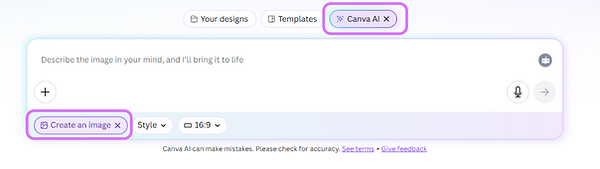
To start, access www.canva.com/dream-lab and ensure that "Canva AI" and "Creating an Image" are enabled.

Copied
Copy and paste the prompt here, and click "Enter" to start generating images.

Select a suitable welcome card.
bottom of page